Vector Database
A specialized database designed to store, index, and search high-dimensional vectors (embeddings), enabling fast and efficient similarity searches across massive datasets based on semantic meaning rather than exact keyword matches.
The Simple Version
Imagine a traditional library catalog. If you search for “automobile,” it only finds books with the exact word “automobile.” It misses books that say “car” or “vehicle.”
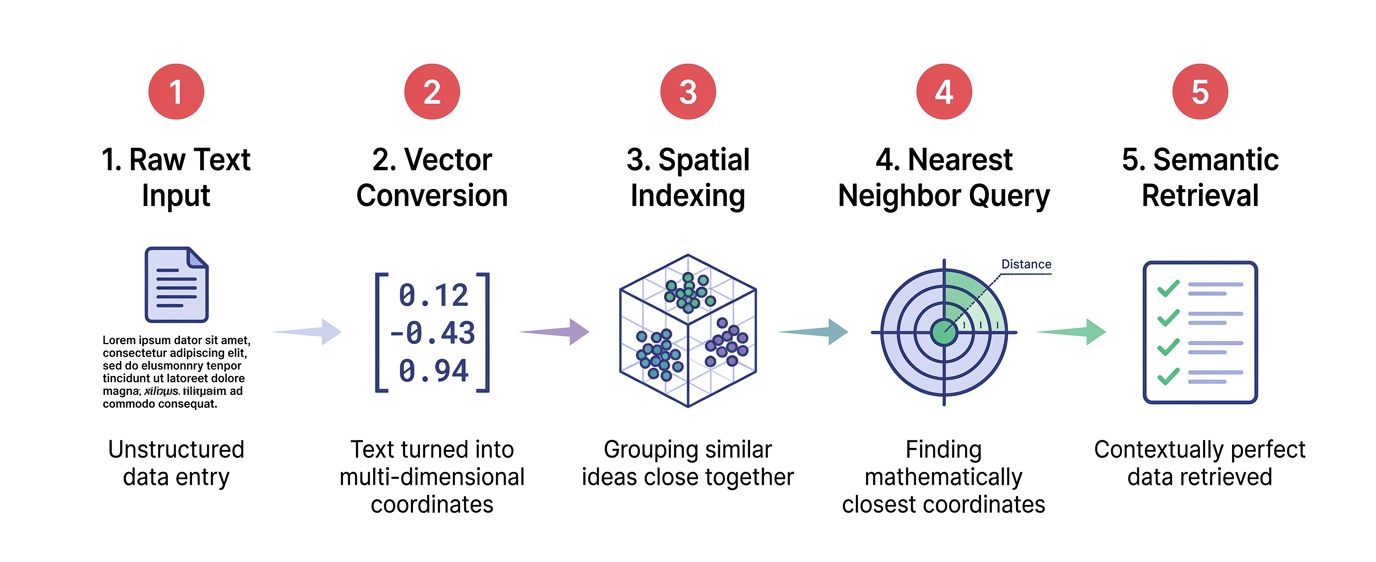
A vector database is like a library where every book has been assigned a “theme coordinate” in a massive, multi-dimensional room. If you search for “automobile,” the system doesn’t look for the word; it goes to the “automobile” coordinate and grabs all the books physically located nearby, which naturally include books about “cars” and “vehicles.” It finds things by meaning, not by exact spelling.
Visual Workflow
Detailed Explanation
As AI models generate embeddings (dense vectors representing data), traditional relational databases (SQL) or document stores (NoSQL) struggle to search them efficiently. Vector databases solve this.
Core Components:
- Vector Storage: Stores the high-dimensional arrays (e.g., 1536 floats per item) alongside metadata (e.g., document ID, source URL, date).
- Indexing Algorithms: Uses Approximate Nearest Neighbor (ANN) algorithms like HNSW (Hierarchical Navigable Small World) or IVF (Inverted File Index) to organize vectors for lightning-fast search, sacrificing a tiny bit of accuracy for massive speed gains.
- Similarity Metrics: Calculates distance between vectors using Cosine Similarity, Euclidean Distance (L2), or Dot Product.
How it powers RAG (Retrieval-Augmented Generation):
- User asks a question.
- Question is converted into an embedding.
- Vector database finds the top K most similar document embeddings.
- Those documents are sent to the LLM as context to generate an accurate answer.
Key Characteristics
- Semantic Search: Finds conceptually similar items, not just lexical matches.
- High Dimensionality: Optimized to handle hundreds or thousands of dimensions per record.
- Scalability: Can index and search billions of vectors in milliseconds.
- Hybrid Search: Modern vector databases often combine vector search with traditional keyword (BM25) search for optimal results.
Business Context
Vector databases are the critical infrastructure layer for enterprise Generative AI:
- Enterprise Search: Searching across internal wikis, PDFs, and Slack messages by meaning.
- Recommendation Engines: Finding products or content similar to a user’s past behavior.
- Fraud Detection: Identifying anomalous transactions that “look similar” to known fraud patterns.
- Vendor Landscape: Leading options include Pinecone, Milvus, Qdrant, Weaviate, and vector extensions for PostgreSQL (pgvector).
Real-World Analogy
A music streaming service’s “Discover Weekly” playlist. It doesn’t just recommend songs with the same genre tag. It analyzes the audio features (tempo, key, instrumentation) of songs you like, places them in a “musical space,” and recommends other songs that are mathematically close to your favorites in that space.
Code Example
# Simple vector search using ChromaDB (a popular local vector database)
import chromadb

# 1. Initialize the vector database (in-memory for this example)
client = chromadb.Client()
collection = client.create_collection(name="company_docs")

# 2. Add documents and their pre-computed embeddings
# (In practice, you would generate these embeddings using a model like OpenAI or SentenceTransformers)
collection.add(
    documents=[
        "Our Q3 revenue increased by 15% due to strong enterprise sales.",
        "The new employee handbook outlines a 4-day work week policy.",
        "The IT department will perform server maintenance this Sunday."
    ],
    ids=["doc1", "doc2", "doc3"],
    # Mock embeddings for demonstration (normally these are 1536-dim arrays)
    embeddings=[
        [0.1, 0.8, 0.2],
        [0.9, 0.1, 0.1],
        [0.2, 0.2, 0.9]
    ]
)

# 3. Perform a semantic search
results = collection.query(
    query_embeddings=[[0.15, 0.75, 0.25]], # Embedding for "How did the company perform financially?"
    n_results=1
)

print("Most relevant document:", results['documents'][0][0])
Common Misconceptions
- Myth: Vector databases replace traditional databases.
- Reality: They complement them. Vector databases are terrible at transactional operations (like updating a user’s bank balance). They are used alongside SQL/NoSQL databases.
- Myth: Vector search is always 100% accurate.
- Reality: Most vector databases use Approximate Nearest Neighbor (ANN) search. It’s incredibly fast but might occasionally miss the absolute closest match in exchange for millisecond latency.